About Patch My PC Integration
The Patch My PC (PMPC) feature in Master Packager Toolbox helps you upload packages to PMPC Custom Apps. Patch My PC’s catalog includes updates for more than 3,000 applications, but many applications are still outside the catalog. The Custom Apps feature lets you use the same automation, customization, and consistency for your own packages. The PMPC integration makes it easier to upload custom packages to PMPC Cloud.
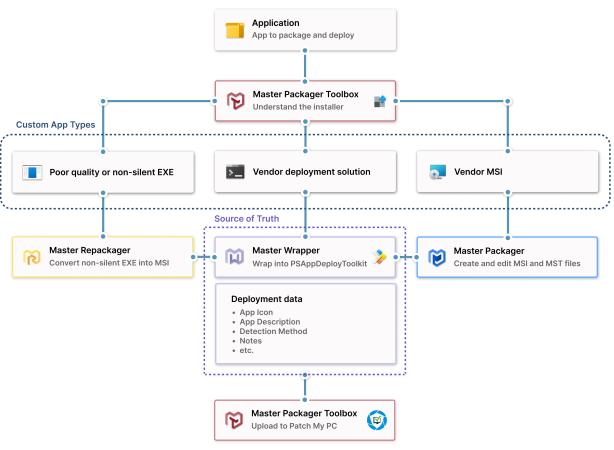
By following this workflow, you can standardize and improve the process of creating custom apps.
Benefits
- Custom app readiness
Master Packager provides tools for packaging installers that do not support silent installation from the system account. This helps you upload apps that are not available in the PMPC catalog. - Standardization
PSAppDeployToolkit (PSADT) helps standardize packaging and deployment processes. - Consistent application management
Standardized packaging, updating, and deployment workflows help manage custom applications consistently. - Time savings
Using Master Wrapper together with Master Packager Toolbox reduces manual effort. Metadata stored in the package is reused to prefill required fields.
Master Packager packaging flow for Patch My PC
- Use Master Packager or Repackager to package applications. Make sure your application can be installed silently and has the desired end-user configuration.
- Use Master Wrapper to wrap your packaged application with PSAppDeployToolkit. In this step, define the main app icon and app description.
- Use Master Packager Toolbox to upload the prepared package to PMPC.