Templates
Templates help you automate repeated changes when working with MSI and MST files.
You can store reusable edits, keep preferred custom actions in one place, and run PowerShell scripts whose returned values are inserted into MSI tables during template application.
How to use templates
The Templates view shows all templates present in the MSI.
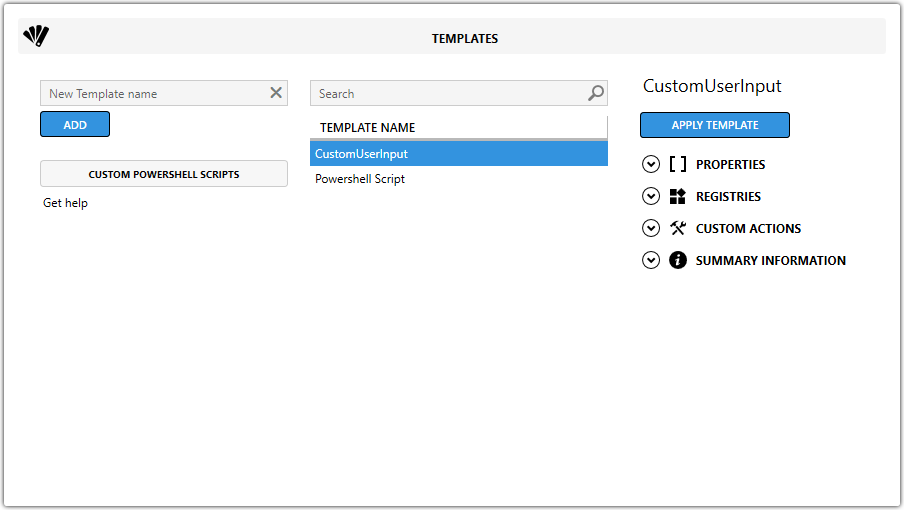
Supported MSI tables
Templates support the Property, Registry, Component, Custom Action, Install Execute Sequence, Binary, and Summary Information tables.
Create a custom template
Follow the same basic workflow for each supported table:
- Open the
MSIand go to the source table. - Select one or more rows to add to the template.
- Right-click one of the selected rows and select Add to Template.
- Enter a new template name and click the arrow button in the left text box, or choose an existing template from the dropdown on the right.
- Review any table-specific settings.
- Select Add to create or update the template.
| Source table | Additional steps |
|---|---|
| Property | Double-click the Operation and Apply On columns to choose the settings used when applying the template. |
| Registry | No additional steps. |
| Custom Action | No additional steps. |
| Summary Information | Choose when to apply the changes in the Apply On dropdown, then edit the remaining values. |
If the selected custom actions use rows in the Binary table, Templates detects that automatically and saves the binaries as well.
Template automation patterns
Use the following patterns when a template value should be deleted, resolved, or left unresolved.
| Pattern | Purpose | Example or result |
|---|---|---|
<delete> | Deletes a value from Summary Information when the template is applied. | <delete> leaves the value blank after application. |
[PROPERTY_property_table_name] | Inserts the value of an existing property from the Property table when the template is applied. | [PROPERTY_COMPANYNAME] resolves to the value of COMPANYNAME. |
[COMPANYNAME] | Keeps the property unresolved until MSI installation time. | [COMPANYNAME] remains [COMPANYNAME]. |
[PS_COMPANYNAME] | Inserts the value returned by a custom PowerShell script named PS_COMPANYNAME. | Use the script name in square brackets. |
Predefined templates
Master Packager includes predefined templates such as Convert CMD Command to VBS.
These built-in templates save time on common tasks.
Manage the template order carefully so changes are applied in the correct sequence, especially when combining multiple templates.