Custom Actions
The Custom Actions view displays all custom actions in the MSI package.
Custom actions let you run scripts or executables during installation and uninstallation when standard MSI tables are not enough.
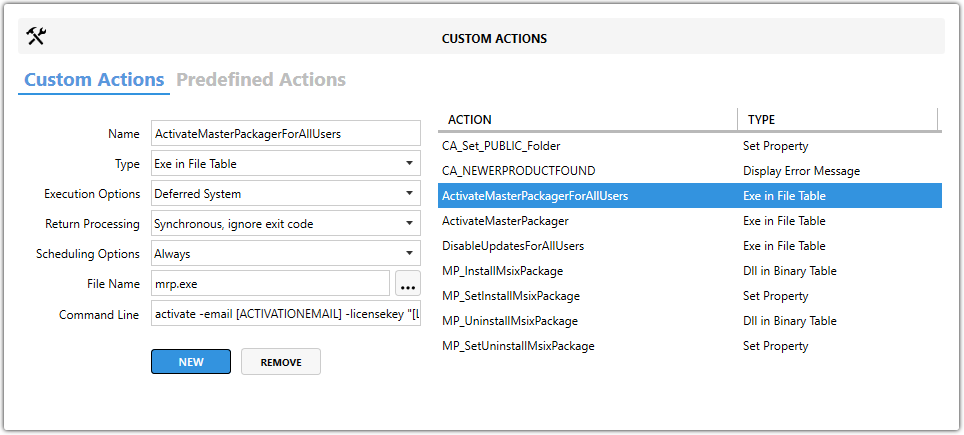
Action groups
Master Packager supports two groups of actions:
- Custom Actions — actions you build for a specific automation scenario.
- Predefined Actions — standardized actions created by the Master Packager team for common tasks that are not covered by standard
MSItables.
Core fields
| Field | Description |
|---|---|
| Name | Sets the custom action name. Use a unique, descriptive name so the purpose is easy to identify. |
| Type | Sets the custom action type and where the action source is stored. |
| Execution Options | Defines when the action runs and under which security context. |
| Return Processing | Defines how the installer handles the action result. |
| Scheduling Options | Determines how often the action runs and where it fits in the sequence. |
Supported custom action types
| Type | Available sources or subtypes |
|---|---|
| JScript | In Binary TableIn File TableIn CustomAction TableIn path of Property |
| VBScript | In Binary TableIn File TableIn CustomAction TableIn path of Property |
| DLL | In Binary TableIn File Table |
| EXE | In Binary TableIn File TableOn Target PCIn path of Property |
| MSI Internal | Display Error MessageSet DirectorySet Property |
Execution options
| Option | Description |
|---|---|
| Immediate | Runs immediately when the installer processes the action. |
| Deferred User | Runs later during the execution phase under the user context. |
| Rollback User | Runs during rollback under the user context. |
| Commit User | Runs at the end of installation if everything succeeded, under the user context. |
| Deferred System | Runs later during the execution phase under the system context with elevated privileges. |
| Rollback System | Runs during rollback under the system context. |
| Commit System | Runs at the end of installation if everything succeeded, under the system context. |
| Deferred TSAware | Runs during the execution phase as a Terminal Server-aware action. |
| Rollback TSAware | Runs during rollback as a Terminal Server-aware action. |
| Commit TSAware | Runs during the commit phase as a Terminal Server-aware action. |
Return processing
| Option | Description |
|---|---|
| Synchronous, waits for exit code | Runs the action, waits for it to finish, and checks the exit code. |
| Synchronous, ignore exit code | Runs the action, waits for it to finish, and ignores the result. |
| Asynchronous, waits for exit code | Starts the action, continues processing, and later waits for completion and checks the result. |
| Asynchronous, ignore exit code | Starts the action and continues immediately without waiting or checking the result. |
tip
For critical tasks, use a synchronous option so the installer can handle failures correctly.
Scheduling options
| Option | Description |
|---|---|
| Always | Executes every time the action is encountered. |
| Execute first time | Runs only during the initial install, not during repairs or reinstalls. |
| Execute once per process | Runs only once even if it is referenced multiple times in the sequence. |
| Execute only after UI sequence | Delays execution until after the user interface sequence is complete. |
note
Proper scheduling helps custom actions run in the correct context and avoids unintended repeated execution.
Predefined actions
Standardized actions created by the Master Packager team for common tasks that cannot be performed by using standard MSI tables.
See the full list in the Predefined Custom Actions section.