Apply HKCU Registries to All Users
Use this predefined action to write HKEY_CURRENT_USER (HKCU) registry entries to every existing user profile and to the default user profile during a SYSTEM-context installation.
This lets you deliver per-user settings even when the MSI runs under SYSTEM, which is common in enterprise deployments.
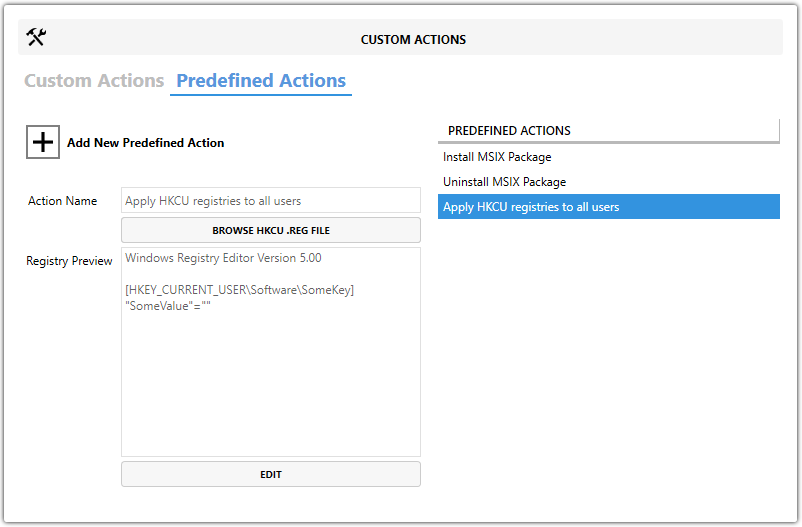
When to Use It
Use this action when application settings stored in HKCU must be applied consistently for all users, including users who sign in after the installation is complete.
Registry Data Format
You can import a .reg file or enter the registry data manually. Use the following format:
Windows Registry Editor Version 5.00

[HKEY_CURRENT_USER\Software\SomeKey]
"SomeValue"="1"
Provide Registry Data
| Option | Description |
|---|---|
| Browse HKCU .REG File | Imports registry data from a .reg file. |
| Edit | Opens the editor so you can enter or paste registry data manually. |
| Registry Preview | Lets you review the parsed entries before saving the action. |
Steps
- Open the
MSIorMSTin Master Packager. - In the left pane, select Custom Actions.
- Open the Predefined Actions tab.
- Click Add New Predefined Action and select Apply HKCU Registries to All Users.
- Add the registry data by using Browse HKCU .REG File or Edit.
- Review the entries in Registry Preview to confirm they are correct.