Replace String in Text File
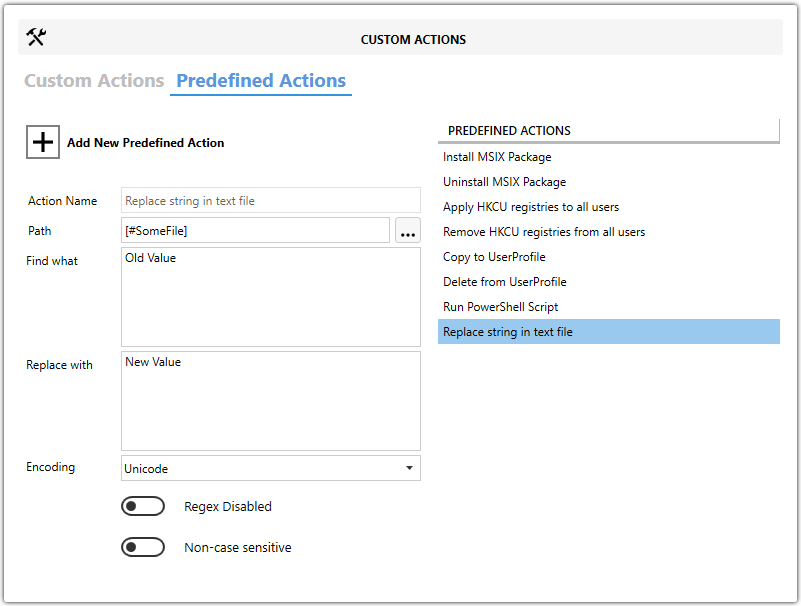
Use this predefined action to find and replace text in a file during installation.
It is useful when you need to update configuration values such as paths, server names, or connection strings.
note
This action works only with text-based files such as .ini, .xml, .json, or plain-text files. It does not support binary file editing.
Fields
| Field | Description |
|---|---|
| Path | Specifies the target file to update. |
| Find what | Specifies the text value to search for. |
| Replace with | Specifies the value that replaces the matched text. |
| Encoding | Specifies the target file encoding, such as UTF-8 or ANSI. |
| Regex Disabled | Treats Find what as a literal text value instead of a regular expression. |
| Non case sensitive | Makes the search case-insensitive. |
info
Select the correct Encoding. Using the wrong encoding can corrupt the file contents.
Steps
- Open the
MSIorMSTin Master Packager. - In the left pane, select Custom Actions.
- Open the Predefined Actions tab.
- Click Add New Predefined Action and select Replace String in Text File.
- Set Path to the target file.
- Enter the search value in Find what.
- Enter the replacement value in Replace with.
- Select the correct Encoding.
- Enable Regex Disabled if you want to search for literal text only.
- Enable Non case sensitive if the search should ignore letter case.
tip
Back up important files and confirm the encoding before running the action.