Services
The Services view shows the Windows services included in the MSI and lets you install, configure, or remove them.
info
Service settings are stored in the ServiceInstall and ServiceControl tables.
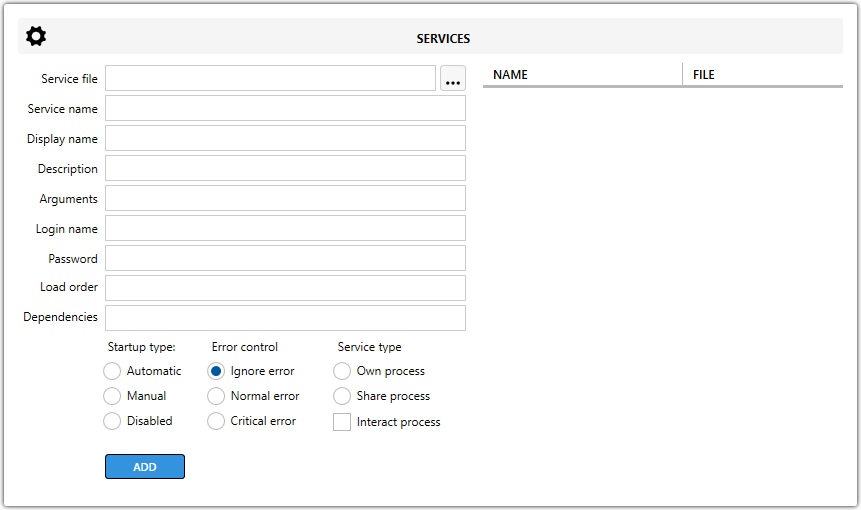
Service fields
| Field | Description |
|---|---|
| Service File | Specifies the path to the service executable. |
| Service Name | Defines the internal service name. |
| Display Name | Sets the name shown in Windows Service Manager. |
| Description | Adds a description for the service. |
| Arguments | Specifies command-line arguments passed to the service. |
| Login Name | Defines the user account the service runs under. |
| Password | Sets the password for the specified login name, if required. |
| Load Order | Sets the load order group for the service. |
| Dependencies | Lists the services that must start before this service. |
Startup type options
| Option | Description |
|---|---|
Automatic | Starts the service automatically. |
Manual | Starts the service only when requested. |
Disabled | Prevents the service from starting. |
Error control options
| Option | Description |
|---|---|
Ignore error | Windows continues even if the service fails to start. |
Normal error | Windows logs the error and continues with normal handling. |
Critical error | Windows treats the startup failure as critical. |
Service type options
| Option | Description |
|---|---|
Own process | Runs the service in its own process. |
Share process | Runs the service in a shared process such as svchost.exe. |
Interact process | Allows the service to interact with the desktop. |
note
You can also configure services to stop or be deleted during uninstall.