Summary Information
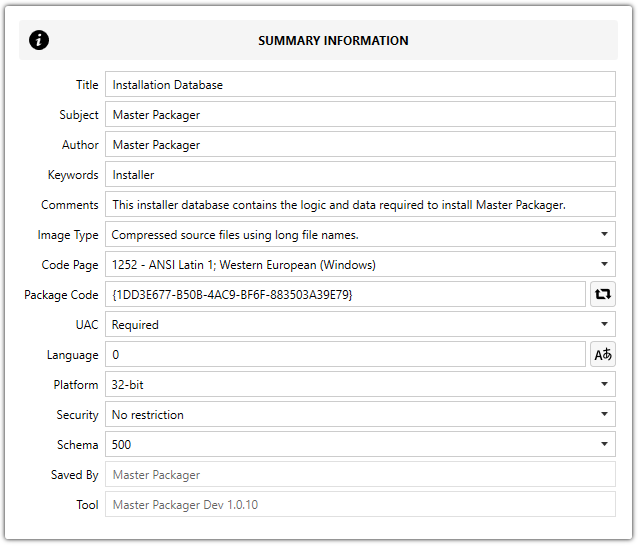
Summary information contains MSI package metadata. These values are visible when you right-click the MSI file in Windows File Explorer, select Properties, and open the Details tab.
File details metadata
The following fields map directly to the Details tab in the MSI file properties dialog:
| Field | Details tab label | Description |
|---|---|---|
| Title | Title | Descriptive title for the installer package. |
| Subject | Subject | Short summary of the package contents. |
| Author | Authors | Name of the person or organization that created the package. |
| Keywords | Tags | Search keywords associated with the package. |
| Comments | Comments | Additional notes or description visible in file properties. |
Image Type
Defines how the MSI stores its source files.
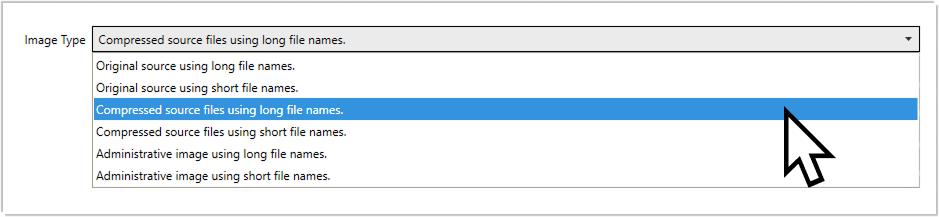
Available options:
Original source using long file namesOriginal source using short file namesCompressed source files using long file names(default)Compressed source files using short file namesAdministrative image using long file namesAdministrative image using short file names
Code Page
Sets the numeric ANSI code page used for strings stored in the summary information.
Package Code
A unique GUID that identifies this specific MSI package. It is stored in the MSI Summary Information stream, not in the MSI Property table.
Every time Master Packager creates a new MSI, it generates a unique Package Code GUID.
UAC
Controls whether Windows shows a User Account Control prompt during installation.
Available options:
Required(default) — users receive a UAC prompt.Not Required— non-admin users see an insufficient privileges error unless the MSI is started from an elevated process.
Language
Sets the Summary Information language. Default: 0.
Platform
Specifies which processor architectures the MSI supports.
Available options:
ArmIntel(default) — use for Windowsx86. Still allows installation on Windowsx64.Intel64x64(default) — use for Windowsx64. Does not allow installation on Windowsx86.
Security
Sets security restrictions for the MSI file.
Available options:
No restrictionRead-only recommended(default)Read-only enforced