Edit Table Schema
The Edit Table Schema feature lets advanced users create new MSI tables or modify existing ones. Use it when you need to change the database structure, not just table contents.
With this feature, you can define new tables or adjust existing columns, data types, and constraints.
note
Changing table schemas can affect MSI behavior. Back up the package before making schema edits.
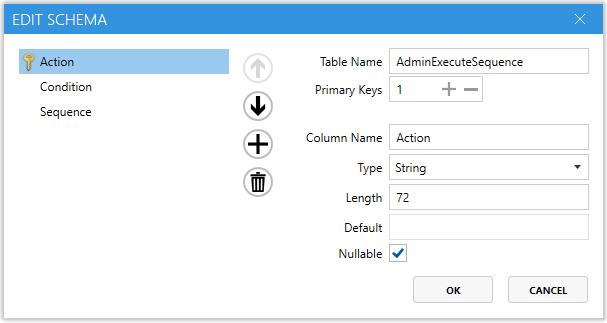
Schema fields
| Field | Description |
|---|---|
Table Name | Defines the MSI table name you are editing or creating. |
Primary Keys | Shows how many primary key columns the table has. Primary keys uniquely identify each row. |
Column Name | Defines the name of a column. You can add, remove, or rename columns as needed. |
Type | Integer — Numeric values.String — Text values.Binary — Binary data such as images or scripts. |
Length | Defines the maximum size of the column value. This mainly applies to text and other variable-length data types. |
Default | Sets a default value for new rows unless you change it manually. |
Nullable | Checked — The column can be left empty.Unchecked — Every row must contain a value. |
Picture | Defines a picture mask used for validation or formatting in certain data types. It is often left blank unless a specific pattern is required. |
When to use it
Use this feature when you need to:
- Create custom tables in the
MSI. - Add, remove, or rename columns in existing tables.
- Package custom logic that requires new data structures.
- Troubleshoot schema issues in a corrupted
MSI.