Add Windows Firewall Rules
This Script Builder tool creates Windows Firewall rules from the Master Wrapper interface and generates the required PowerShell commands automatically.
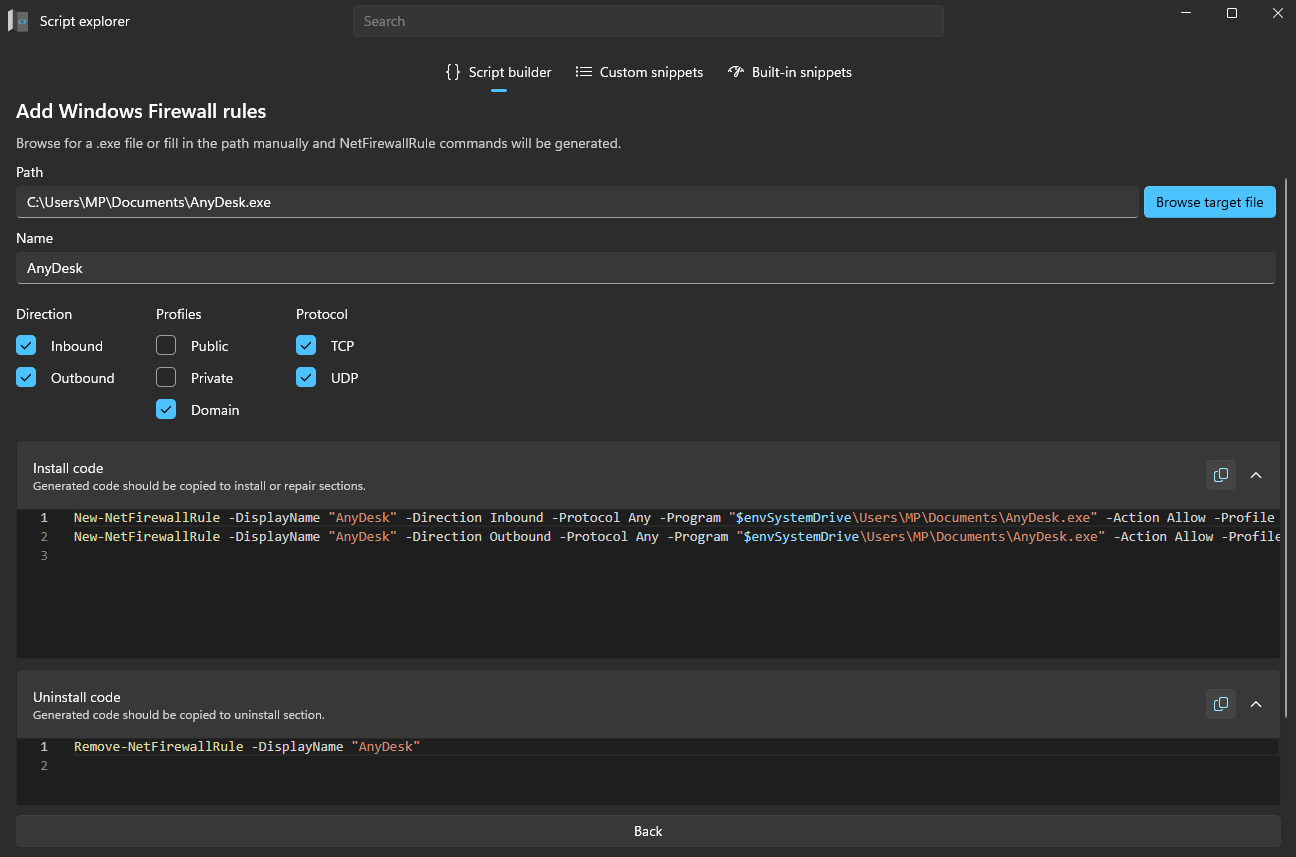
Create firewall rules
- Select Browse target file and choose the target
.exefile. The full path is added to Path automatically. - Enter a Name for the firewall rule.
- Choose the Direction:
Inbound,Outbound, or both. - Select the Profiles the rule should apply to:
Public,Private, orDomain. - Choose the Protocol:
TCP,UDP, or both.
After you enter the details, Master Wrapper generates the PowerShell commands automatically.
Generated code
| Output | Description |
|---|---|
| Install code | Contains the generated New-NetFirewallRule commands. Copy it into the Install or Repair section. |
| Uninstall code | Contains the generated Remove-NetFirewallRule command for cleanup during uninstallation. |